




When selling age-restricted products and services on the Shopify store, you must add an age verification popup to your Shopify store. To add age verification on your website, you choose any method.
Before you get started adding age verification on the website, know more about age verification.
Age verification pop up
Websites with specific age groups or age-limited products or services use a popup or “age verification gates” to verify visitors before they browse the information on the website.
For example – Companies that sell Tabacco, Alcohol, Sex toys, and other adult products use age verification gates to verify visitors’ age.
Here is the image of the age verification gate or pop-up on a Shopify website
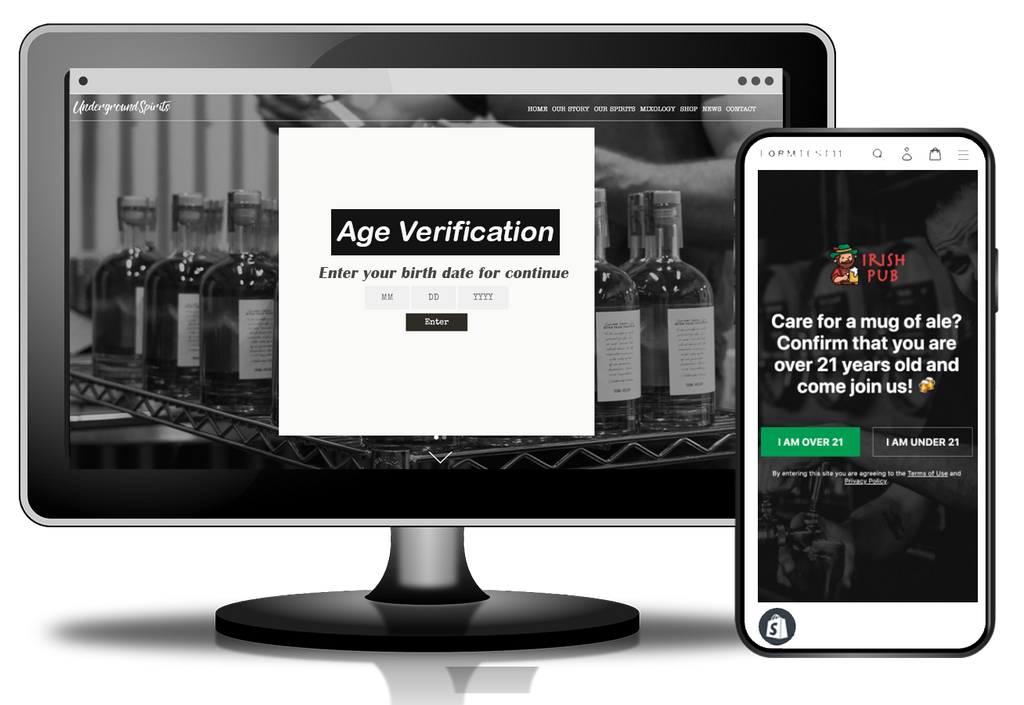
Some companies used an age verification page, or some used an age verification pop up both are good ways to ensure the age of visitors before they browse a website or store.
Need for age verification
For many companies, age verification is a legal requirement, and some use it for ethical purposes.
A website providing adult entertainment or gambling platform with age verification can avoid the fines or penalties from the governments and federal authorities.
Also, a website selling adult products can avoid any fines even when a minor buys products and use them.
To avoid penalties, fines, or bane from government or legal authorities, you should use age verification pop-ups on your website. It also helps you target your explicit audience on your website.
Also read: Does Your Shopify Website Need to Add Age Verification?
Risks if your website does not have age verification
Website owners could face certain risks if they don’t use age verification on their websites. It could also damage brand marketing and credibility.
Here are some risks owners could face
Non-compliance penalties
The General Data Protection Regulation (GDPR) ensures the protection and security of online users’ data and it applies to all companies irrespective of their business, services, or products. If any company fails to concede, GDPR can fine companies $23 million or 4% of their turnover.
Harm website credibility
It can also harm the website’s credibility if you don’t restrict minors to come on your website when you are selling adult services and products.
Loss of money
It can also lead you to a loss of money. In some cases, parents take legal action against the companies after their children buy products and do the transaction with companies not have age verification popups.
After reading all the above points, you get the answer to all your questions about age verification needs, risks, and what it is.
Now jump to the section on adding age verification to your Shopify store.
There are two types of age verification popup
- Simple age verification with Yes/No option – The age verification form with two options Yes/No to enter the website is known as a simple popup.
- Age verification by submitting birth date – The other way to ensure the age of visitors is by submitting birthdates.
As we pointed out in starting, there are two methods to add age verification to your website. First, we explain the steps of the method without using the app.
Add Age Verification without Using App (Free)
Follow the steps below to add age verification to your Shopify store.
- Login to the admin panel, and go to Online Store > Themes option.

- If you have installed multiple themes, choose the theme which you want to edit, then click the Actions > Edit code option in the dropdown menu.

- Now click on the Snippets folder to view the content in it.
- Click on the Add new snippet under the Snippet folder to add new code.
- Name your snippet age-check, and click on Create snippet.

Your newly created snippet will open now in the code editor. - Open the GitHub code file in the new tab.
- Copy the complete code you see on GitHub and return to the theme page.
- Paste the copied code in the snippet file age-check.liquid that opens in the online code editor.
- Click on Save, as you can see in the right top corner of the code editor.
- In the Layouts folder, locate and click on your theme.liquid file to open it in the online code editor.
- In the default, Shopify code editor, scroll down until you see the <body> tag.
-
Paste the following code right after the body tag opens.
{% render ‘age-check’ %}
After pasting the above code, the age-check.liquid file will be called first when your body content loads in the browser. - Click on Save to save all your changes.
Now age verification is added successfully to your Shopify store.
You can edit or add some additional functionality to the age verification code. Like
If you want to add an image
Upload a JPG image (at least 1024 by 1024 pixels) to your store theme assets on the Edit HTML/CSS page. Rename that file age-check-background.jpg.
You can change the age limit
In your age-check.liquid snippet, change the following code on line number 2:
{% assign age = 18 %}
to:
You can also add a date of birth picker
In your age-check.liquid snippet, change the following code on line number 1:
to:
In the end, don’t forget to test all the changes you have done.
Add age verification using an app
You can use third-party apps to add age verification to your Shopify store. We suggest you Age check + Age verification app by Zooomy.

This app is a highly rated app with 4.9 stars and has 71 reviews.
Pricing – You have to pay $3.99 per month to use this app on your store.
Features
- You can add a logo and image in the background.
- Two date formats are available.
- Customizable text “Submit” and “Exit“.
- Use any URL to hyperlink Exit text.
- You can customize the size, color, text, headline, and sub-headline.
- Completely responsive on all devices.
- No coding skills are required to install the app.
If you are finding it difficult to add age verification to your Shopify store, get our expert Shopify website designers and developers’ help or buy our predefined setup age verification popup to Shopify task from our website.